

MCP Server
The official MCP server for Crisphive. Point Claude, ChatGPT, Cursor, or any MCP client at Crisphive and it can manage customers, browse your service catalog, check real scheduling availability, and book jobs for a field operations business — every REST endpoint of the Developer API, exposed as a tool.
https://api.crisphive.com/mcpTry these first
Connect (a chsk_test_ sandbox key is enough), then paste any of these straight into your agent — the same prompts appear on every Crisphive listing, so this is exactly the first-run experience everywhere:
- Job creation — “Schedule a 2-hour HVAC job at 145 Laurier Ave W tomorrow for Marie Tremblay, 613-555-0142.”
createCustomer → listJobRequestBookingWindows → createJobRequest → quoteJobRequest → confirmJobRequest - Emergency insertion — “Emergency plumbing job now at 99 Bank St for David Okafor (613-555-0198) — show me what gets rescheduled.”
listEmergencyCandidates → previewEmergencyReschedule → commitEmergencyReschedule - Daily outline — “Outline my day tomorrow and flag anything at risk.”
listJobRequests → getTechnicianSchedule - Availability discovery — “Find 3 hours this week for a bike ride with my wife without risking any jobs.”
getTechnicianSchedule→ the agent reasons over the schedule’s slack
Same ask, your language
The engine doesn’t care who’s talking — a dispatcher, the owner, or a developer drive the same tools. Here are the same asks, phrased the way each of them would actually type:
| Use case | Operator (dispatcher) | Business owner | Developer |
|---|---|---|---|
| Job creation | Schedule a 2-hour HVAC maintenance job at 145 Laurier Ave W tomorrow at 1 pm for Marie Tremblay (613-555-0142) and confirm it. | Book a 2-hour HVAC maintenance visit tomorrow at 1 pm at 145 Laurier Ave W for Marie Tremblay, 613-555-0142, with whoever can make it. | Call listCustomers with phone=+16135550142. Then bookAndConfirmJobRequest with customer {full_name: Marie Tremblay, phone: +16135550142}, address 145 Laurier Ave W, Ottawa, scheduled_at tomorrow 13:00 business-local, job_duration_minutes=120 and an idempotency_key. Return confirmed, short_code and assigned_technician_id; if confirmed is false, return refusal. |
| Emergency insertion | Insert an emergency P0 job right now at 99 Bank Street for David Okafor (613-555-0198) — burst pipe — and show me what gets rescheduled to make room. | David Okafor (613-555-0198) has a burst pipe at 99 Bank Street. Get someone there now and tell me which customers get bumped. | createJobRequest for David Okafor (+16135550198) at 99 Bank St, then updateJobPriority to p0. Call listEmergencyCandidates, then previewEmergencyReschedule with the best candidate, and return the jobs that move and their new start times. Wait for my OK before commitEmergencyReschedule. |
| Daily outline | Outline my schedule for tomorrow, flagging any tight travel windows. | Give me a plain-English rundown of tomorrow across all my crews — who is where, and where the day is tight. | listJobRequests for tomorrow (scheduled_from / scheduled_to in business-local dates), then getTechnicianSchedule for each assigned technician. Return one ordered timeline per technician with the gap before each job. |
| Availability discovery | Find a 3-hour window in my work week when I can go on a bike ride with my wife without moving any jobs. | When this week can I go on a bike ride with my wife without anything on the schedule slipping? | getTechnicianSchedule for my technician ID for this week. Return every contiguous gap of 3 hours or more inside working hours with no job in it, earliest first. |
| Skill + travel matching | Which of my technicians who do gas fitting are free Thursday morning near Kanata? | Do I have anyone qualified for gas fitting who could cover a Kanata job Thursday morning? | listSkills to find the gas-fitting skill ID. listNearbyTechnicians around Kanata, then listTechnicianSkills for each result and keep those with that skill. For each, getTechnicianSchedule for Thursday 08:00–12:00 and return who is free. |
How it works
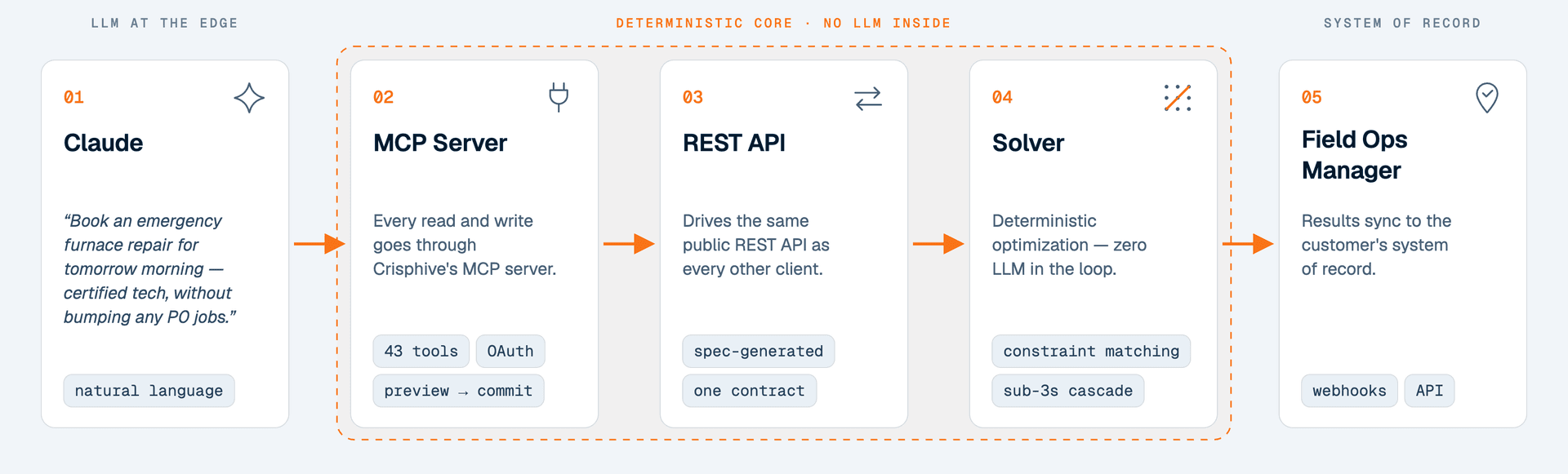
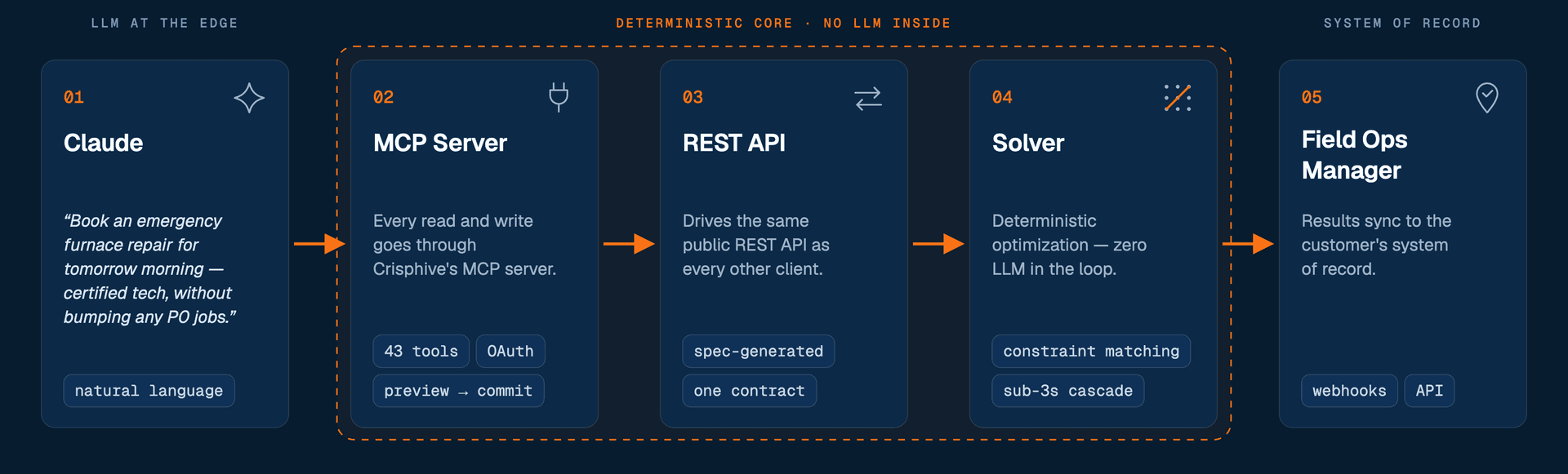
Every prompt above travels the same path: Claude turns natural language into tool calls, the MCP server drives the same public REST API as every other client, and a deterministic solver computes the schedule — no LLM inside the optimization core. Results sync back to the business’s system of record.
Requirements
Any MCP client that speaks remote servers over Streamable HTTP — claude.ai, Claude Desktop, Claude Code, ChatGPT, Gemini CLI, Cursor, VS Code, Windsurf, Cline, Zed, LM Studio, and more. claude.ai and ChatGPT sign in with OAuth (a member approves on a consent screen; no key to paste). Clients that can send a custom header may instead use an API key (Authorization: Bearer chsk_…). The transport is stateless (plain JSON responses — no SSE, no sessions) and the server exposes tools only.
Install
Pick your client below to see exactly how to connect it:
Run one command. Omit the header to authorize in your browser (OAuth), or pass an API key to skip the browser step:
# OAuth — you'll be prompted to authorize in the browser
claude mcp add --transport http crisphive https://api.crisphive.com/mcp

# …or pass an API key to skip the browser step
claude mcp add --transport http crisphive https://api.crisphive.com/mcp \
  --header "Authorization: Bearer chsk_test_YOUR_KEY"
Step-by-step guides, with every screen and field: Claude, ChatGPT, voice agents (ElevenLabs, Vapi, Retell) and an n8n AI Agent.
Authentication
Requests authenticate with a secret API key sent as a bearer token — the same key as the REST /v1 API. Create keys from your Crisphive business dashboard. The key prefix decides which data the agent works with:
chsk_live_…→ live (production) data.chsk_test_…→ sandbox (isolated test) data. An agent with a test key can only ever touch sandbox data — the recommended way to let it experiment.
Keep the key server-side and load it from the environment — never commit it or ship a chsk_ key in a client-side app.
/mcp with an API key? The key’s own lifetime applies — chosen at creation (30 days by default, from 1 up to 365), fixed for the life of the key. See Authentication for the renewal procedure.OAuth 2.1 (no API key)
Building a claude.ai / ChatGPT connector — or any product where your users bring their own Crisphive business? The /mcp endpoint is also a full OAuth 2.1 Authorization Server: any member of the business can authorize your agent on a consent screen, the connection gets that member’s role, and no key is ever copied. A compliant MCP client runs the whole flow automatically (you normally write no OAuth code), triggered by a 401 carrying WWW-Authenticate: Bearer resource_metadata="…":
| Step | Request |
|---|---|
| 1. Discover the resource | GET /.well-known/oauth-protected-resource (RFC 9728) → the Authorization Server URL |
| 2. Discover the AS | GET /.well-known/oauth-authorization-server (RFC 8414) → endpoints; PKCE S256 required; grants authorization_code + refresh_token |
| 3. Register | POST /oauth/register (RFC 7591 Dynamic Client Registration) → client_id (public client, no secret — PKCE is the proof) |
| 4. Authorize | GET /oauth/authorize?… — a member of the business signs in to Crisphive and consents |
| 5. Exchange | POST /oauth/token (grant_type=authorization_code, code, code_verifier) → { access_token, refresh_token, expires_in } |
| 6. Refresh | POST /oauth/token (grant_type=refresh_token) → a rotated token pair (the old refresh token is single-use) |
Each tool profile URL (see Tool profiles) has its own protected-resource document: /.well-known/oauth-protected-resource/mcp/voice, …/mcp/dispatch and …/mcp/crm, so a client that compares its connector URL with the advertised resource finds an exact match.
From there, call /mcp with Authorization: Bearer <access_token> — identical to the API-key path. The token is bound to the consenting member’s business, region, and environment, so an agent can never reach another tenant or flip live↔sandbox. The agent acts as the person who approved it — it can never do more than that member could in the dashboard, and it stops working if they are removed or suspended. A Technician’s agent, for example, cannot read the business-wide job board. Request a narrower scope (space-separated permission codes, e.g. customers_view job_view) to limit it further; omitting it means everything that member may do. Access tokens live ~1 hour — use the refresh token to stay connected. The same token also works against the REST /v1 API — see Build a multi-tenant integration.
Connection lifetime
An MCP connection is governed by two independent clocks. An agent in daily use is never disconnected on a schedule; one that is forgotten expires on its own.
- Idle window — 30 days. Every token refresh issues a new refresh token good for another 30 days. Keep using the connection and it rolls forward indefinitely; go quiet for 30 days and it lapses.
- Absolute cap — 90 days. Regardless of activity, a connection ends 90 days after the member approved it. The business can set this to anything from 1 to 365 days per connection with Set lifetime under Settings → Developer → MCP connections; the countdown is measured from the original approval, not from the change.
When either clock runs out, refreshing fails and a member must approve the app again from the consent screen. Treat any failed refresh as “restart the authorization flow”, never as a retryable error. The business’s Owners and Administrators are emailed 14 days before a connection expires — re-approving needs a person in a browser, so the warning comes earlier than for keys.
Tools
There is one tool per operation of the public /v1 API — same names as the SDK methods (listCustomers, createJobRequest, …), generated from the same OpenAPI spec so REST and MCP never drift. Path/query parameters and request-body fields are flattened into a single arguments object per tool.
| Group | Tools |
|---|---|
| Customers CRM sync, full CRUD | listCustomers · createCustomer · getCustomer · updateCustomer · deleteCustomer |
| Bookings book, quote, confirm & track | bookAndConfirmJobRequest · createJobRequest · quoteJobRequest · confirmJobRequest · listJobRequests · getJobRequest · getJobRequestTimeline · listJobRequestChanges · listJobRequestBookingWindows · listMatchingSlots · listCrewCandidates · updateJobPriority |
| Dispatch moves, emergencies & sick calls | previewJobRequestMove · commitJobRequestMove · listEmergencyCandidates · previewEmergencyReschedule · commitEmergencyReschedule · previewAbsenceResolve · commitAbsenceResolve · getTechnicianSchedule · listNearbyTechnicians |
| Catalog job types, skills & service areas | listJobTypes · getJobType · createJobType · updateJobType · deleteJobType · listSkills · listSkillCategories · listSkillsByCategory · createSkillCategory · deleteSkillCategory · createSkill · updateSkill · deleteSkill · listServiceAreas · getServiceArea · createServiceArea · updateServiceArea · deleteServiceArea |
| Team & fleet roster, time off, relations & vehicles | listTechnicians · getTechnician · createTechnician · updateTechnician · deleteTechnician · listAssignableGroups · createTechnicianTimeOff · listTechnicianTimeOff · listTechnicianSkills · replaceTechnicianSkills · replaceTechnicianBuddies · replaceTechnicianLeads · replaceTechnicianServiceAreas · replaceTechnicianVehicles · listVehicles · getVehicle · createVehicle · updateVehicle · deleteVehicle |
| Webhooks subscriptions for automation platforms | createWebhookEndpoint · deleteWebhookEndpoint · listWebhookEventTypes |
- Every tool returns the raw REST envelope —
{ error_code, message, data }— as text; agents unwrapdataon success and readerror_codeon failure. - Restricted keys apply unchanged: a key scoped to
customers_viewgets a403from write tools. - Every tool that sends a
POST(createCustomer,createJobRequest,bookAndConfirmJobRequest, …) accepts an optionalidempotency_key, forwarded as theIdempotency-Keyheader — pass the same value when retrying so a retry never creates a duplicate. - Header inputs are arguments too: e.g.
listJobRequestBookingWindowstakesx_timezone(an IANA timezone, sent as theX-Timezoneheader). - Every tool declares an
outputSchemaand returnsstructuredContent(the parsed envelope) alongside the text, so typed clients can skip re-parsing. - Every tool carries behavior hints so clients know when to ask:
readOnlyHintfor lookups;destructiveHintfor anything that overwrites, reschedules or deletes (updates, deletes and the three “commit” tools);openWorldHintfor every write, because a write can email or text a customer or technician, send a webhook or update a connected calendar. Matching reads are also open world because they price travel through Google Maps — they still change nothing.
Tool profiles
A model chooses better from fewer tools, and some clients (voice platforms in particular) import every tool a server offers. Each URL below is the same server with the same sign-in and the same permissions — it only changes which tools are shown:
| URL | Tools | For |
|---|---|---|
https://api.crisphive.com/mcp | Every tool | Claude, ChatGPT and general agents |
https://api.crisphive.com/mcp/voice | Caller lookup, open times, booking | Phone agents (voice agents) |
https://api.crisphive.com/mcp/dispatch | The board, moves, emergencies, sick calls, roster reads | A dispatcher’s assistant |
https://api.crisphive.com/mcp/crm | Customers and their bookings | CRM and front-desk agents |
The older form /mcp?profile=voice (and ?profile=dispatch, ?profile=crm) still works. A tool outside the chosen profile cannot be called through that URL.
A typical agent flow looks like this:
listSkills / listJobTypes                → discover reference IDs
createCustomer                           → { customer_id }
listJobRequestBookingWindows             → offer only the returned windows
createJobRequest                         → booking created
getJobRequest / listJobRequestChanges    → track status
Pagination
List tools accept page / limit and return a meta object (per_page, current_page, total_pages), so an agent can walk large result sets a page at a time.
Rate limits
Requests are rate-limited to 240 requests per minute per key, shared with REST. Each MCP tool call also makes one REST request, so that is about 120 MCP tool calls per minute. On a 429 envelope, back off and retry.
Errors
Every tool returns the Crisphive response envelope (as text and as structuredContent): error_code is 0 on success, or a stable string on failure (CUSTOMER_NOT_FOUND, API_KEY_INVALID, …). Match on the code, never the message text. An invalid or revoked key returns HTTP 401 (API_KEY_INVALID) — fix the header and reconnect. A key past its lifetime returns 401 with API_KEY_EXPIRED — create a replacement key. An OAuth connection whose grant has run out returns OAUTH_GRANT_EXPIRED — re-run the authorization flow from the consent screen.
Protocol notes
- POST one JSON-RPC 2.0 message (or a batch of at most 20) per request; responses are
application/json, and notifications are acknowledged with202. - The server is stateless — no session id is issued or required;
GET /mcpreturns405(there is no server-push stream). - UUID path arguments are validated before dispatch — a non-UUID id returns an in-band tool error, never a different operation.
- Accepted protocol revisions:
2025-06-18,2025-03-26,2024-11-05.
Documentation
- Guides — start here for the concepts and booking flows.
- API reference — every endpoint, argument, and schema.
- For AI — the OpenAPI spec plus a ready-to-paste assistant bootstrap.
openapi.json— the machine-readable spec the tools are generated from.